Nội Dung Chính
Anyone who has run ads for a school, a tutoring center or an online course knows the awkward moment before launch. You have a budget, a deadline and a vague memory of the Instagram Reel that "got the tone exactly right" two weeks ago. Then you scroll for twenty minutes and cannot find it. Education advertising lives on short, human video, and the people who make good campaigns tend to keep a reference library of what works. This article looks at one free tool for building that library, EzyDownload, and tells you plainly where it helps and where it does not.
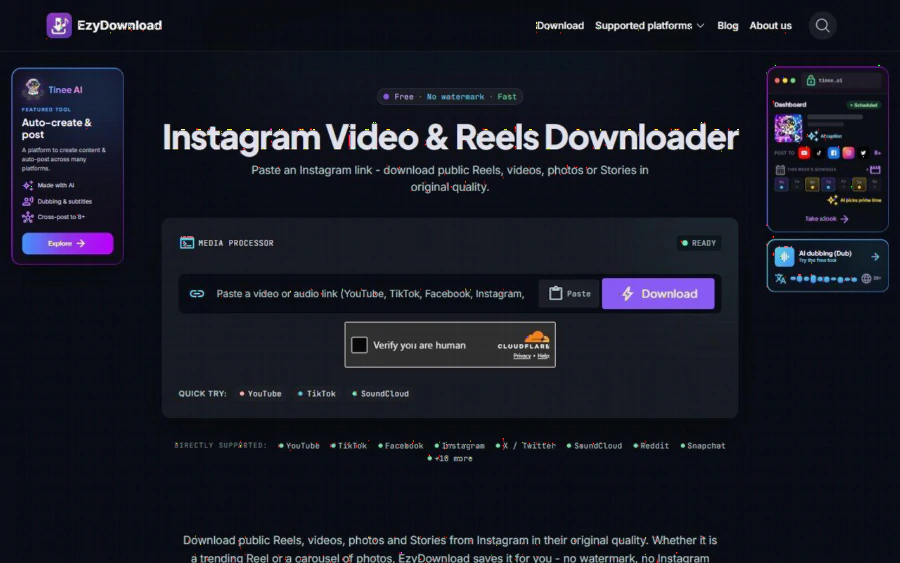
EzyDownload Instagram downloader page with the paste box and Download button
The scenario this review uses
To keep this concrete, here is a made-up example. It is a hypothetical, not a real case study. Imagine a marketing coordinator at a small evening tutoring center, preparing a back-to-school campaign. The center has a modest ad budget and one phone. The coordinator wants a "swipe file": a folder of short Instagram videos that show what clear, friendly explainer content looks like, so the team can discuss pacing, captions and hooks in a Monday meeting.
The coordinator has three kinds of material. First, the center's own Reels, posted over the last year. Second, a few clips from a teacher who agreed in writing to let the center use them. Third, public Reels from other education accounts that the team wants to study, not republish. Each kind has different rules, and the tool is only useful for the first two without extra thought. More on that in the limits section.
What EzyDownload actually does
EzyDownload is a browser-based downloader. Per the page for its free Instagram saver for Reels and carousels, you paste a link to a public Reel, video, photo or Story and it returns the file in original quality. The page states that files come back clean, with no logo or username added, that you do not need to log in to Instagram, and that nothing needs to be installed, no app and no browser extension.
The flow is three steps, as the page describes it. Copy the post link and paste it into the box. Choose a format, MP4 video or MP3 audio, and a quality. Then download. The listed video options run from 360p up to 4K UHD (2160p), and audio comes in 128, 192 and 320 kbps. Carousels are detected item by item, so each photo or video can be saved separately. Public Stories can be saved within their 24 hour lifetime.
On pricing, the site is blunt: it says there are no hidden fees, no subscription and no cap on basic downloads. The tool also supports more than 18 platforms in total, including YouTube, TikTok, Facebook, X and SoundCloud, according to the the main EzyDownload page. For a coordinator who also studies TikTok and YouTube ads, one tab covers all of it.
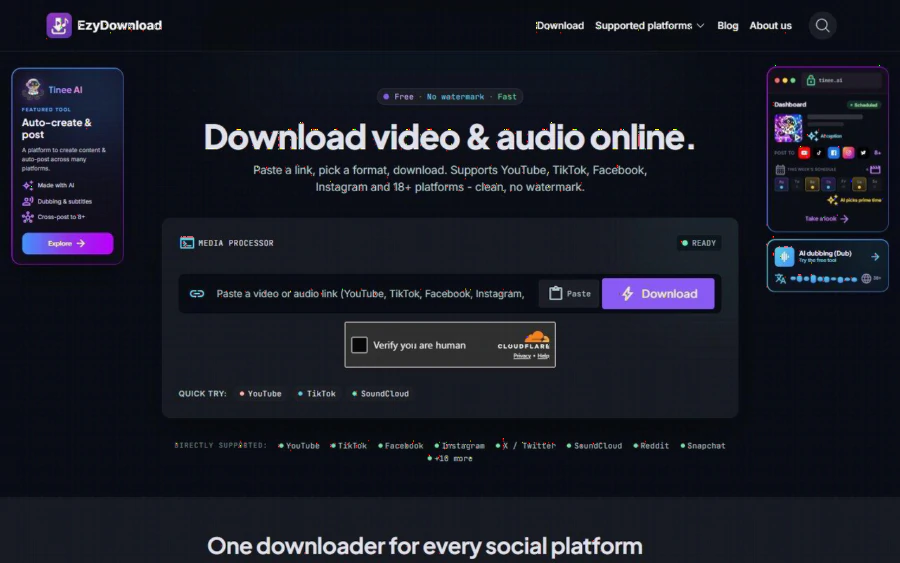
EzyDownload homepage listing supported platforms and the Free, No watermark, Fast badges
Where it fits in an education ad workflow
Building the swipe file. The coordinator pastes the link of each of the center's own Reels, picks 1080p MP4, and saves the file into a folder named by campaign. Because the files carry no overlay, they can be dropped straight into a side-by-side review slide. That matters when the point of the meeting is to compare the opening two seconds of six videos.
Pulling audio for a voiceover test. The MP3 option is handy when a teacher recorded a good explanation in a Reel and the team wants to reuse the spoken part in a new cut. At 320 kbps the audio is good enough for a rough edit, which is all a draft needs.
Archiving before an edit. Teachers sometimes delete or re-upload posts. Saving a copy of your own published Reel before it changes gives you a record of what ran and when.
Saving carousels for slide ideas. Education accounts often post carousels that read like mini lesson slides. Being able to save each frame separately makes it easier to discuss layout.
None of this needs an account, which removes one small friction. A part-time marketer who borrows a colleague's laptop does not have to sign in anywhere.
Strengths worth naming
- Price. Free, with no sign-up. For a center that counts every dollar of the ad budget, a zero-cost utility is easy to approve.
- Range of quality. Having both 360p and 4K lets you save a small file for a chat message and a large one for a final edit.
- Privacy posture. The site says no logs are kept and that media is streamed, not stored on its servers after download. That is a claim by the vendor, and you should read it as such, but it is a sensible stance for a tool that handles links.
- Breadth. One tool across 18 or more platforms means fewer bookmarks.
Limits, stated honestly
It only reaches public content. Private accounts are not supported, and the page says private Stories are not supported either. If the teacher's account is private, this will not work, and it should not.
Copyright is your responsibility. This is the biggest issue for the coordinator in our example. Saving a public Reel for private study is different from posting it in your own ad. Downloading does not give you any rights. Reusing another account's video, music or face in a paid campaign without permission can lead to takedowns, account strikes or worse. In the hypothetical, the center should stick to its own content and to clips covered by written permission, and treat other accounts' Reels as inspiration only. If you are unsure, ask the creator.
There is a verification step. In my screenshots the page shows a "Verify you are human" check before downloading. It is a minor step, but if you plan to save thirty clips in a row, expect a few extra clicks.
It is a downloader, not an editor. You get the file. Trimming, captions and resizing for ad placements happen elsewhere. The site also promotes a separate product, Tinee AI, for dubbing and cross-posting. That is an optional side offer and not part of the downloader itself, but you will see it on the page.
No stated file or daily limits. The page says there is no cap on basic downloads, but it does not publish file size or daily limits, so a very heavy batch job is untested territory for me.
Who should use it, and who should not
Use it if you run education marketing on a thin budget, you need quick local copies of your own or permitted Instagram video, and you value a no-account workflow. It suits solo coordinators, teachers who manage their own social feeds and small agencies that review competitor-style creative in internal meetings.
Skip it if your needs are heavy production, because you will want proper editing software anyway. Also skip it if your plan depends on reposting other creators' work without asking. No downloader fixes that problem, and a free one makes it easier to get into trouble.
How to start in five minutes
1. Open the Instagram page and have the link of one of your own Reels ready. On Instagram, use the share menu to copy it.
2. Paste the link into the box and complete the human check.
3. Choose MP4 at 1080p for review use, or MP3 if you only need the audio.
4. Save the file with a clear name, such as the campaign and the date, so the swipe file stays searchable.
5. Repeat for five or six clips, then watch them back to back and write down what the opening seconds have in common.
If you work from a phone, the page includes tips for iPhone and Android, such as saving to Photos through the Files app or finding the file in the Download folder on Chrome for Android.
The bottom line
For a small education team, the real value of a swipe file is not the videos but the conversation they start. EzyDownload makes the collecting part quick, free and account-free, while leaving the legal and creative judgment where it belongs, with you. Treat it as a tidy way to keep your own and permitted footage close at hand, and you will probably get more from it than from anything that promises more.
Các Bài Học Khác

Slot game Ku3933 cụ thể như thế nào? Làm sao để người chơi có thể tham gia trò chơi giải trí này? Hãy cùng theo dõi ngay bài viết chi tiết dưới đây..
Xem thêm ⟶
Khám phá nổ hũ BJ88 với hàng nghìn game hấp dẫn và tỷ lệ thưởng cao. Tìm hiểu thêm về chuyên mục này qua bài viết sau đây của chúng tôi nhé!
Xem thêm ⟶